PCDS Home
Support Pages
Web services
Email
Webmail
FTP

 
Welcome to the Email Support pages of Peter Cox Design Studio

On this page:

Guide to setting up your email account

Guide to Mailbox Control Panels

Related pages:

Guide to setting up Email Signatures

Guide to MCP Administration details

Guide to MCP Spam Filtering

If your Support query is urgent, please try to contact me on either
+44 (0)1865 858107 (studio) or 07880 607724 (mobile).

For general non-urgent Support queries, please send an email by clicking below:

1. Setting up your email account
 
Download a PDF guide.

Email clients covered:

  • Windows Live Mail
  • Windows Mail
  • Outlook Express
  • Outlook 2003
  • Outlook 2007
  • Outlook 2010
  • Thunderbird
  • Mac Mail

2. Mailbox Control Panels (MCP)
 

If you have been issued with a Mailbox Control Panel you will be notified of this when your account is set up.

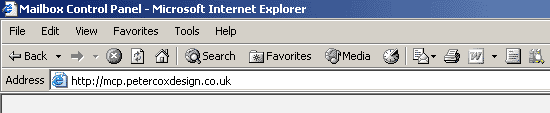
1. To access your Mailbox Control Panel (where applicable) use a browser to go to:

http://mcp.yourdomain.whatever

2. Then use your mail account access information to log in:
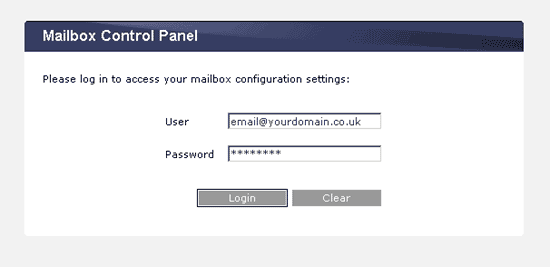
You will have been issued with a Mailbox access password in order to set up your email client to access your mailbox and download your email. Use the same password here.

Once correctly logged-in, you will be able to access the features of your Mailbox Control Panel:
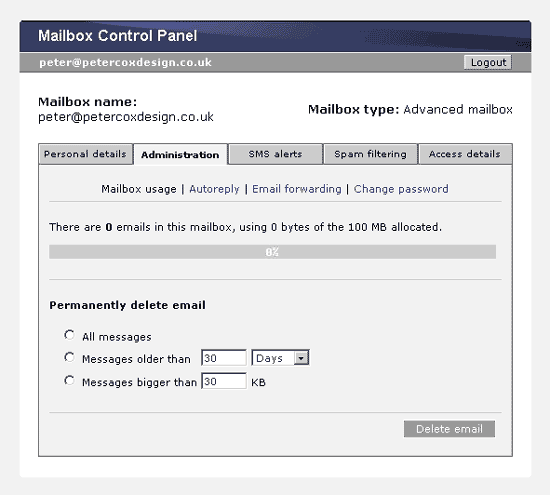
Please note that not all the features illustrated here may be applicable to your Control Panel.

Related pages:

Guide to MCP Administration details

Guide to MCP Spam Filtering


© Peter Cox Design Studio 2006